LIMITED TIME DEAL: Lifetime License slashed from $99 to just $30 — One time, forever! 75% OFF
Now with Multi-Browser Support

Download Anything.
Faster Than
Ever Before.

BoltGrab 2.0 is the download manager that plugs into your browser and supercharges every download. Grab files, videos, and media at lightning speed — with full browser extension integration.

Free to try · No credit card required · Windows 10/11
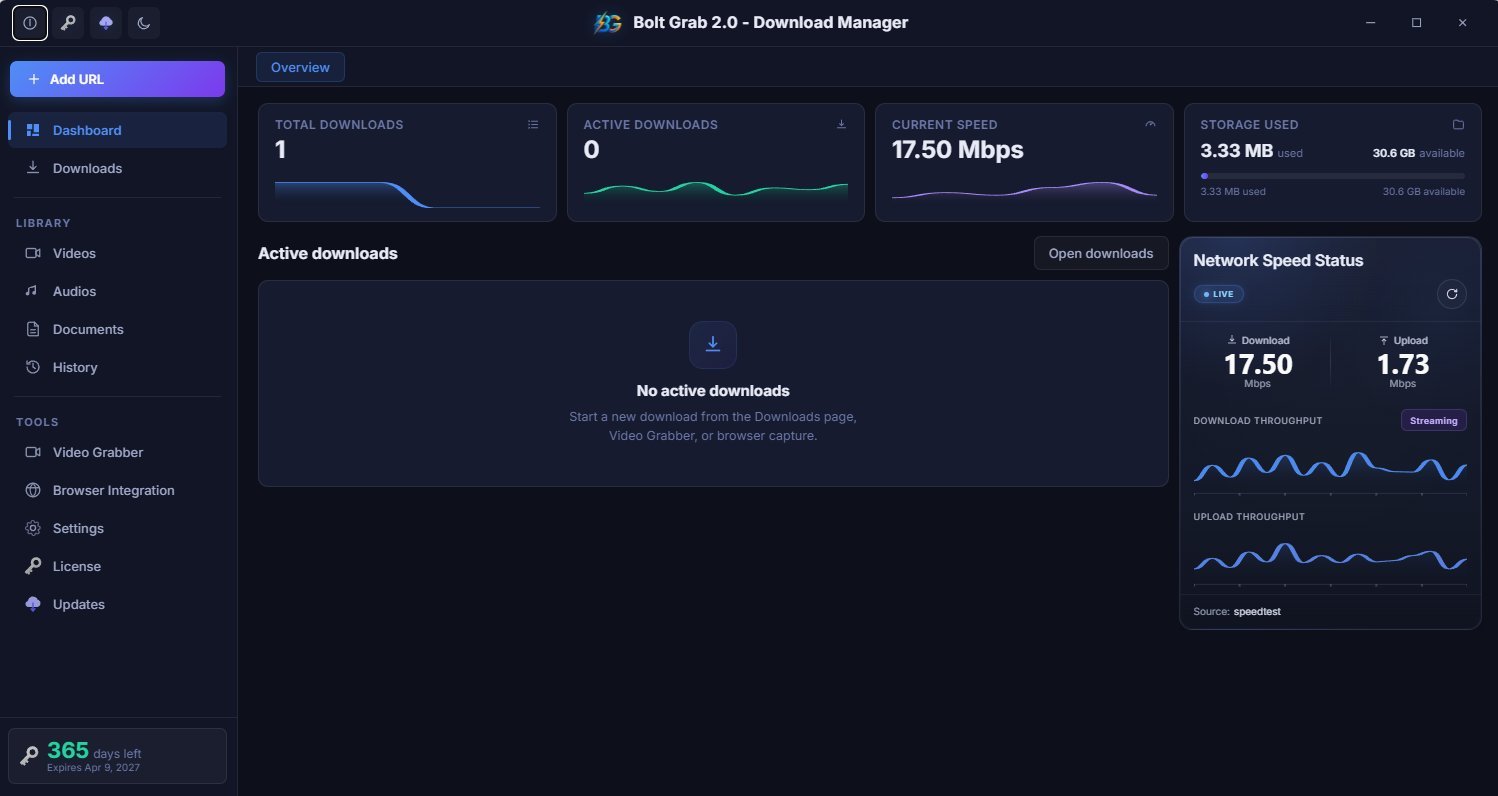
BoltGrab 2.0 App Screenshot
Download Speed
17.50 Mbps
🌐
Browsers Supported
6 Browsers
50K+
Active Users
6
Browsers Supported
Faster Downloads
4.9★
User Rating
Why Choose BoltGrab

Everything You Need.
Nothing You Don't.

Built for power users who refuse to wait. BoltGrab 2.0 is engineered to be the last download manager you'll ever need.

Multi-Thread Acceleration

Splits files into multiple streams for parallel downloading. Get up to 5× faster speeds compared to your browser's built-in downloader.

Seamless Browser Integration

Intercept downloads from Chrome, Edge, Firefox, Brave, and Opera. One click sends any download straight into BoltGrab.

Video Grabber

Detect and grab videos from compatible web pages. Stream or download with one click directly from your browser's video player.

Auto-Resume Downloads

Lost your connection? No worries. BoltGrab automatically resumes interrupted downloads right where they left off.

Download Scheduler

Schedule downloads for off-peak hours to avoid bandwidth throttling. Set it and forget it — BoltGrab handles the rest.

Live Speed Dashboard

Real-time download and upload speed monitoring with beautiful charts. Always know your network performance at a glance.

Browser Integration

Works With Every Browser You Love

BoltGrab 2.0 integrates with all major browsers through its local bridge server — running at 127.0.0.1:32145. Right-click any link, image, video, or audio file and send it to BoltGrab instantly.

🌐
Chrome
✓ Ready
🔵
Edge
✓ Ready
🦊
Firefox
✓ Ready
🦁
Brave
✓ Ready
🔴
Opera
✓ Ready
🧭
Safari
Coming Soon


Browser Integration Panel

One-Click Setup for Any Browser

Browser Integration
Getting Started

Up and Running in Under 2 Minutes

No complicated setup. No config files. Just install, connect, and start downloading at full speed.

01
Download & Install the App

Download BoltGrab 2.0 for Windows. The installer takes under 30 seconds. Launch the app and it starts the local bridge server automatically.

02
Install Your Browser Extension

Go to Browser Integration inside the app and hit Auto Install for your browser. The extension registers in seconds — restart your browser to activate.

03
Start Downloading at Warp Speed

Right-click any link in your browser and choose "Download with BoltGrab". Or paste a URL directly into the app. Watch your downloads fly.

04
Manage, Schedule & Organize

Sort downloads by category — Videos, Audio, Documents. Schedule for later, set speed limits, or let BoltGrab run wild at full throttle.

Simple Pricing

One App. Two Plans.
Zero Surprises.

No subscriptions. No hidden fees. Buy once, own it. Your license covers 1 PC — upgrade or downgrade any time.

1-Year License
Was $25.00
$10
per year · 1 PC
🎉 Save $15 (60% OFF)
  • Full BoltGrab 2.0 Desktop App
  • All Browser Extensions
  • Multi-thread Download Engine
  • Video Grabber Tool
  • 1 Year of Updates & Support
  • Valid for 1 PC
Secure checkout via PayPal · 30-day money-back guarantee · Instant license delivery
Download Now

Start Downloading at
Full Power

Compatible with Windows 10 & 11. macOS version coming soon.

Extensions also available for Edge, Firefox, Brave & Opera inside the app

What Users Say

Loved by Thousands of Power Users

★★★★★

"BoltGrab completely replaced my old download manager. The browser extension is flawless — every link I click just appears in the app. Downloads are noticeably faster."

M
Marcus T.
Software Developer
★★★★★

"The video grabber is insane. I just browse, and if there's a video on the page, BoltGrab catches it. The lifetime deal at $30 is an absolute steal — I paid 3x that for competitors."

S
Sarah K.
Content Creator
★★★★★

"Set it up on all my browsers in under 5 minutes. The auto-install for extensions works perfectly. The speed improvement is real — I'm getting 4–5x faster downloads on big files."

R
Rajan P.
IT Administrator
FAQ

Got Questions?
We've Got Answers.

Is BoltGrab 2.0 free to use?
BoltGrab 2.0 offers a free trial so you can test the core features. For full access including multi-thread acceleration, video grabber, and scheduler, you need a license — starting at just $10/year.
What browsers does BoltGrab support?
BoltGrab 2.0 supports Google Chrome, Microsoft Edge, Firefox, Brave, and Opera via browser extensions. Safari support is currently in development and will be available in an upcoming update.
What does "1 PC" mean for the license?
Your license activates on a single computer. If you switch computers or reinstall Windows, you can transfer your license through your account. Need more PCs? Purchase additional licenses.
Is the Lifetime License really one-time payment?
Yes, absolutely. Pay $30 once and you own BoltGrab 2.0 forever. You get all BoltGrab 2.x updates at no additional cost. There are no recurring fees, no subscriptions, no surprises.
Do you offer refunds?
We offer a 30-day money-back guarantee. If BoltGrab 2.0 doesn't work for you within 30 days of purchase, contact support and we'll issue a full refund, no questions asked.
How do I install browser extensions?
Open the BoltGrab desktop app, navigate to Browser Integration in the sidebar, and click "Auto Install" next to your browser. The extension will register automatically. Restart your browser once to activate it.
Ready to Start?

Stop Waiting on Slow Downloads.
Go Full Speed Today.

Join 50,000+ power users who've ditched slow downloads forever.

Free Download